> ## Documentation Index
> Fetch the complete documentation index at: https://help.ples.com/llms.txt
> Use this file to discover all available pages before exploring further.
# Domain analytics
> Open 12-month Domain Rating, Domain Authority, and Page Authority charts for a monitored domain.
Domain analytics shows current authority metrics and about 12 months of history for one domain you monitor. Open it at `/domain-analytics?id=` plus the domain’s ID.
 ## Steps
Open **Links** (`/links`) and filter to a single domain.
Click **Domain Analytics** in the page header. You can also open the same view from **Reports** when one domain is selected.
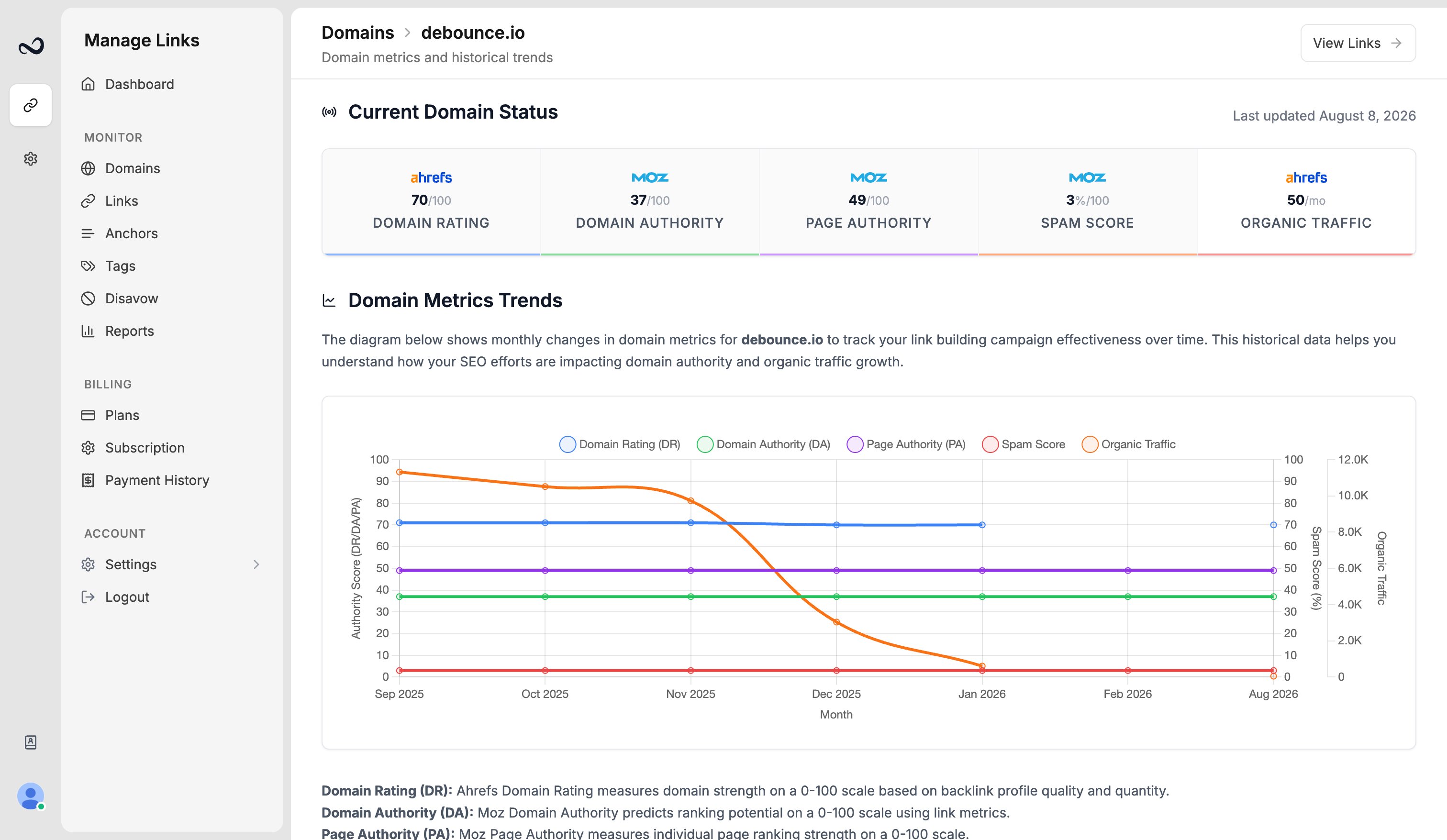
The top row shows **Domain Rating (DR)**, **Domain Authority (DA)**, **Page Authority (PA)**, **Spam Score**, and **Organic Traffic**, with Moz and Ahrefs-style logos next to the matching metrics. **Last updated** uses dates like July 15, 2025.
**Domain Metrics Trends** plots monthly DR, DA, and PA (and related series) for the last 12 months. If monthly tracking has not started yet, the chart area stays empty until the first history points exist.
Use **View Links** to return to `/links` filtered to that domain.
These charts are for the domain you added in Ples, not a live crawl of the whole web.
## What's next?
Add a domain you own so Ples can monitor backlinks that should point to it.
DA, PA, and spam score come from Moz. Domain Rating is shown in the Ples UI.
LQS is a 0–100 score from DA, DR, PA, spam, traffic, and EFL.
Read URL, status, anchor, GI, DR, DA, LQS, last checked, and more.
## Steps
Open **Links** (`/links`) and filter to a single domain.
Click **Domain Analytics** in the page header. You can also open the same view from **Reports** when one domain is selected.
The top row shows **Domain Rating (DR)**, **Domain Authority (DA)**, **Page Authority (PA)**, **Spam Score**, and **Organic Traffic**, with Moz and Ahrefs-style logos next to the matching metrics. **Last updated** uses dates like July 15, 2025.
**Domain Metrics Trends** plots monthly DR, DA, and PA (and related series) for the last 12 months. If monthly tracking has not started yet, the chart area stays empty until the first history points exist.
Use **View Links** to return to `/links` filtered to that domain.
These charts are for the domain you added in Ples, not a live crawl of the whole web.
## What's next?
Add a domain you own so Ples can monitor backlinks that should point to it.
DA, PA, and spam score come from Moz. Domain Rating is shown in the Ples UI.
LQS is a 0–100 score from DA, DR, PA, spam, traffic, and EFL.
Read URL, status, anchor, GI, DR, DA, LQS, last checked, and more.