> ## Documentation Index
> Fetch the complete documentation index at: https://help.ples.com/llms.txt
> Use this file to discover all available pages before exploring further.
# Link change notifications
> Email up to 5 recipients when a backlink status changes. Toggle per domain and delay alerts 0, 24, 48, or 72 hours.
Ples can email you when a monitored link’s status changes (for example dofollow to not found). Configure this at [app.ples.com/settings/notification](https://app.ples.com/settings/notification). You need **Notifications** permission.
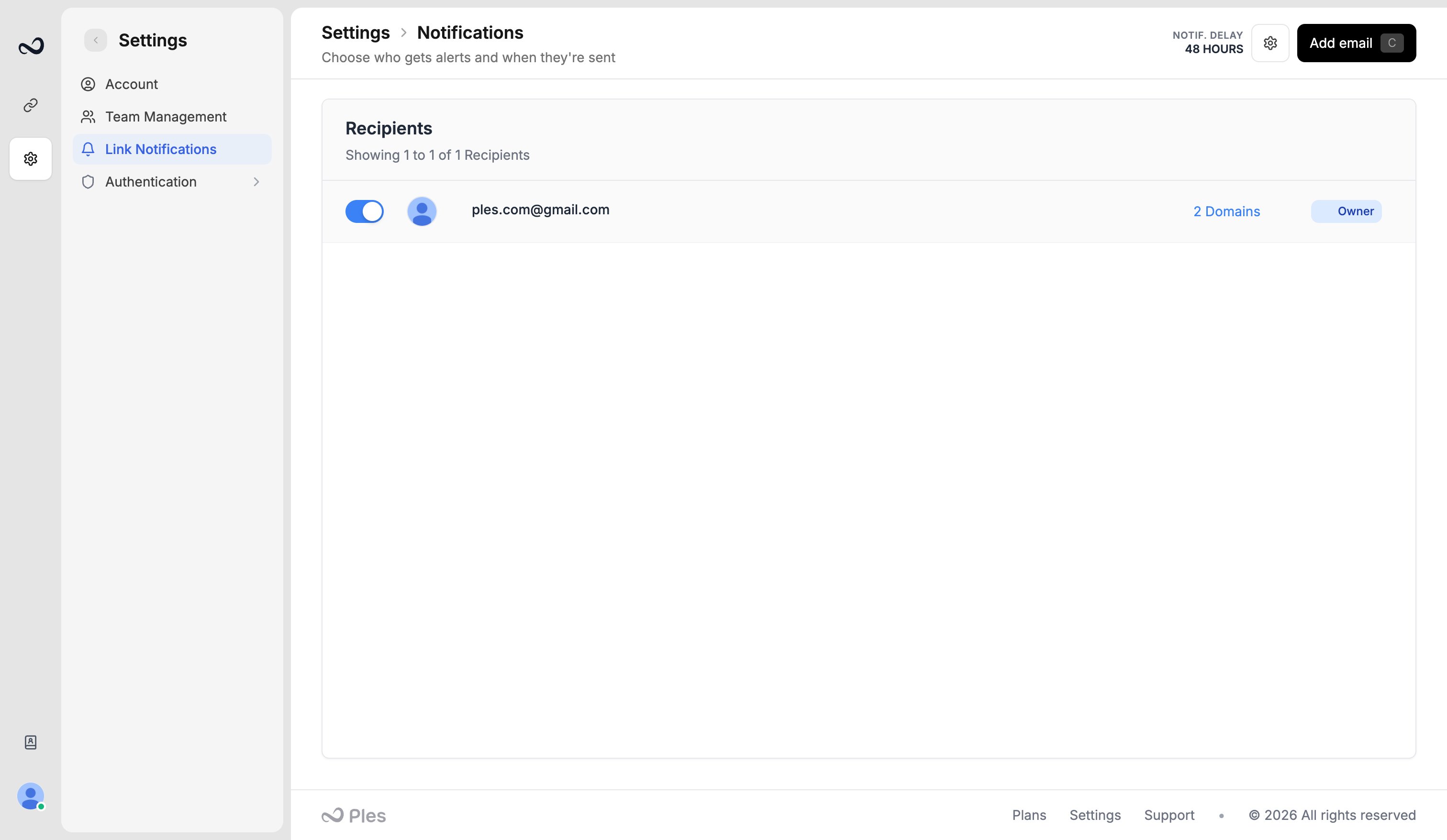 ## Recipients
You can add up to **5** addresses. The account email can be one of them. Add any extra inbox you want to notify.
Each recipient can be limited to specific **domains**. Turn a domain off if that person should not get alerts for it.
## Delay
Choose how long Ples waits before sending, so a one-off scrape miss does not page you:
* **No delay** — send immediately
* **24 hours**
* **48 hours** (recommended)
* **72 hours**
If the link recovers before the delay ends, that alert is not sent.
## Steps
Go to `/settings/notification`.
Add up to five emails. Toggle which domains each one receives.
Open **Notification Delay Settings**, pick 0 / 24 / 48 / 72 hours, and save.
These messages are not the same as [login notification emails](/article/login-notifications). Link-change mail also uses `info@e.ples.com`.
## What's next?
Optionally email yourself when someone signs in, including IP and location.
Find mail from [info@e.ples.com](mailto:info@e.ples.com) and check spam for confirmation, OTP, and alerts.
Dofollow, nofollow, not found, error, and waiting. Checks run about every 24 hours.
Review error, not found, and nofollow links on the Issues page.
## Recipients
You can add up to **5** addresses. The account email can be one of them. Add any extra inbox you want to notify.
Each recipient can be limited to specific **domains**. Turn a domain off if that person should not get alerts for it.
## Delay
Choose how long Ples waits before sending, so a one-off scrape miss does not page you:
* **No delay** — send immediately
* **24 hours**
* **48 hours** (recommended)
* **72 hours**
If the link recovers before the delay ends, that alert is not sent.
## Steps
Go to `/settings/notification`.
Add up to five emails. Toggle which domains each one receives.
Open **Notification Delay Settings**, pick 0 / 24 / 48 / 72 hours, and save.
These messages are not the same as [login notification emails](/article/login-notifications). Link-change mail also uses `info@e.ples.com`.
## What's next?
Optionally email yourself when someone signs in, including IP and location.
Find mail from [info@e.ples.com](mailto:info@e.ples.com) and check spam for confirmation, OTP, and alerts.
Dofollow, nofollow, not found, error, and waiting. Checks run about every 24 hours.
Review error, not found, and nofollow links on the Issues page.