> ## Documentation Index
> Fetch the complete documentation index at: https://help.ples.com/llms.txt
> Use this file to discover all available pages before exploring further.
# Link issues
> Review error, not found, and nofollow links on Issues. Open /links-issues from the dashboard or Links.
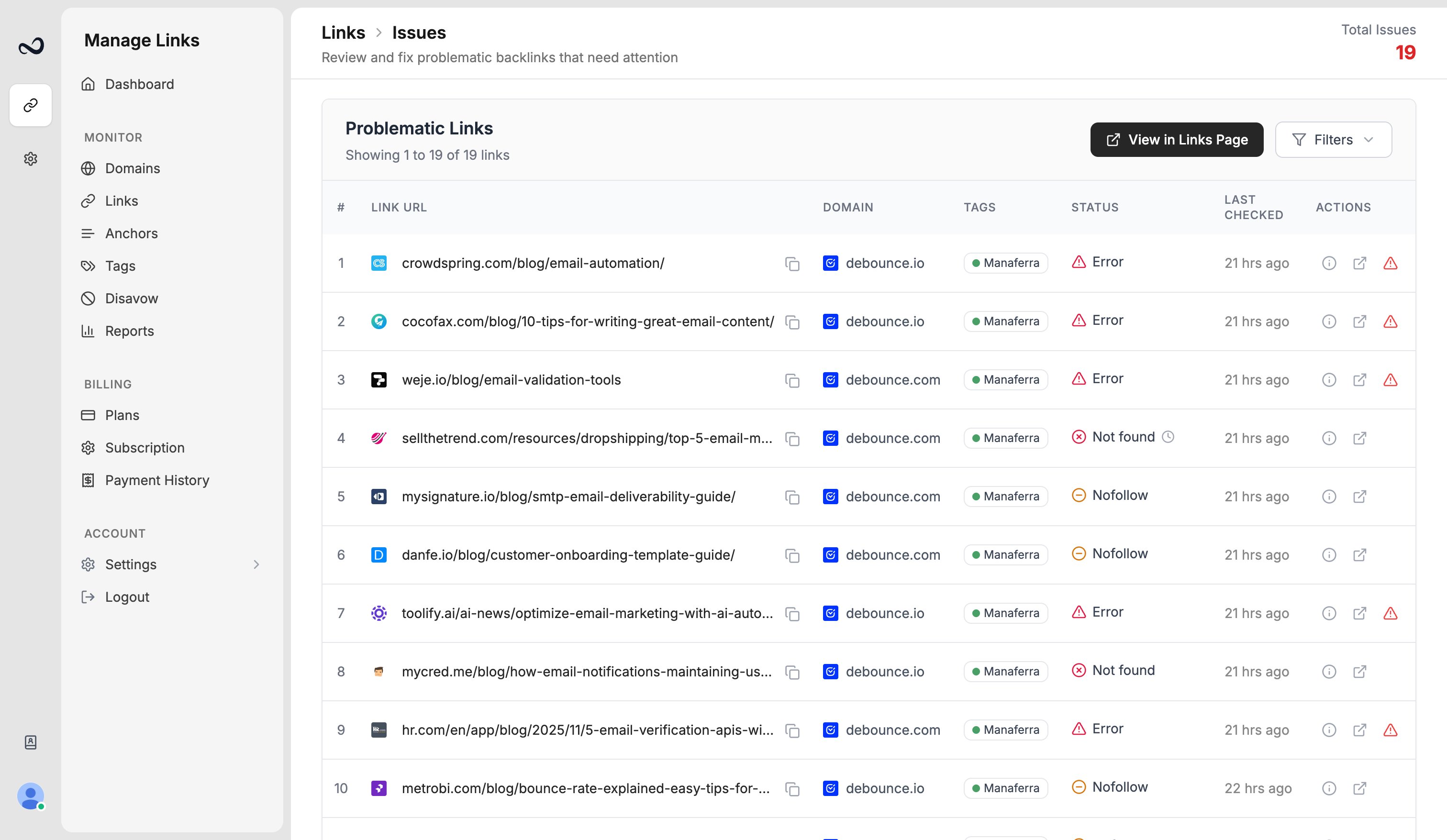
The Issues page (`/links-issues`) lists links that need attention: **Error**, **Not Found**, and **Nofollow**. The dashboard **Issues** card and **Latest issues** section open the same list.
 ## Steps
Go to `/links-issues`, or click **Issues** / **View all issues** on the dashboard.
Narrow by search, domain, or status (error, not found, or nofollow).
Open the URL to confirm whether the link is missing, blocked, or nofollow. Use [Link Visualizer](/article/link-visualizer) if you need to see the page.
Click **View in Links Page** to open `/links` already filtered to those statuses (and domain, if you set one). From there you can [run bulk actions](/article/bulk-actions).
A new-issue marker can appear when a link became an issue during a check in the past 24 hours.
## What's next?
Dofollow, nofollow, not found, error, and waiting. Checks run about every 24 hours.
Select links to add tags, edit contacts, update disavow, or delete rows.
Read URL, status, anchor, GI, DR, DA, LQS, last checked, and more.
Add up to 150 backlink URLs per submission after you choose a domain.
## Steps
Go to `/links-issues`, or click **Issues** / **View all issues** on the dashboard.
Narrow by search, domain, or status (error, not found, or nofollow).
Open the URL to confirm whether the link is missing, blocked, or nofollow. Use [Link Visualizer](/article/link-visualizer) if you need to see the page.
Click **View in Links Page** to open `/links` already filtered to those statuses (and domain, if you set one). From there you can [run bulk actions](/article/bulk-actions).
A new-issue marker can appear when a link became an issue during a check in the past 24 hours.
## What's next?
Dofollow, nofollow, not found, error, and waiting. Checks run about every 24 hours.
Select links to add tags, edit contacts, update disavow, or delete rows.
Read URL, status, anchor, GI, DR, DA, LQS, last checked, and more.
Add up to 150 backlink URLs per submission after you choose a domain.