> ## Documentation Index
> Fetch the complete documentation index at: https://help.ples.com/llms.txt
> Use this file to discover all available pages before exploring further.
# Links table
> Read the Links table: URL, status, anchor, target, GI, DR, DA, SS, EFL, LQS, last checked, and details.
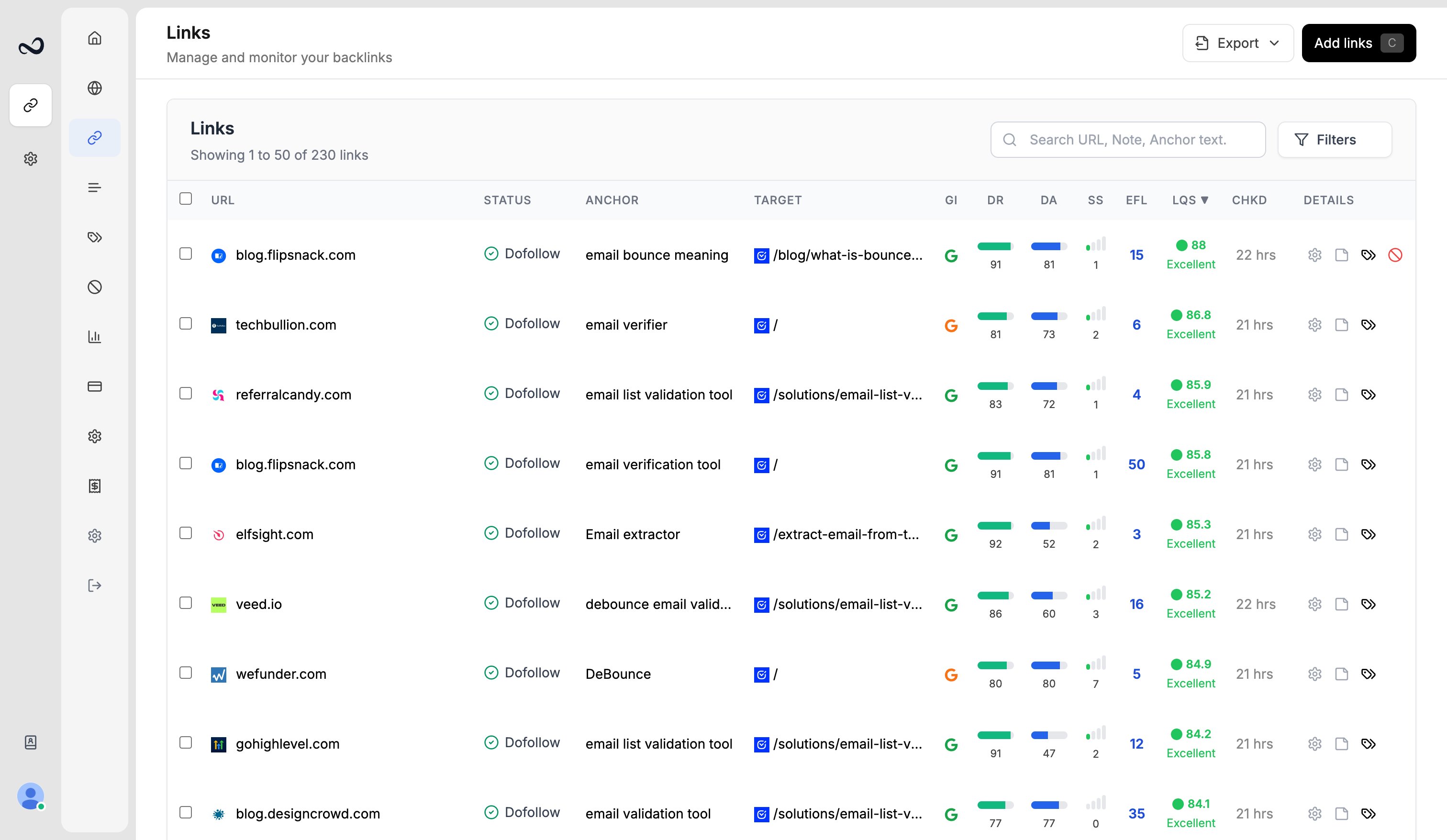
The Links page (`/links`) is the full list of URLs you monitor. Click **Add links** to submit more. Select rows for [bulk actions](/article/bulk-actions).
 ## How to open the table
Open the app and go to **Links** (`/links`), or click **Add links** on an empty table.
Each row is one URL you submitted. Status updates about every 24 hours. Click a URL for [link details](/article/link-details).
## Columns
| Column | What it shows |
| ---------------- | ------------------------------------------------------------------------------------------------------------------------------- |
| **URL** | The page Ples checks |
| **Status** | Dofollow, Nofollow, Not Found, Error, or Waiting — see [Link statuses](/article/link-statuses) |
| **Anchor** | Anchor text found on the page |
| **Target URL** | The href Ples found (labeled **Target** in the table) |
| **GI** | Google indexing: indexed, not indexed, or unknown |
| **DR** | Domain Rating (Ahrefs-style metric, with logo) |
| **DA** | Domain Authority from Moz |
| **SS** | Spam score from Moz |
| **EFL** | External dofollow count on the linking page |
| **LQS** | Link Quality Score, 0–100 |
| **Last Checked** | When Ples last checked the URL (header **Chkd**). Dates look like July 15, 2025 |
| **Created** | When you added the row — shown in [link details](/article/link-details) as **Date added**, and available as a date-added filter |
Click a URL to open [link details](/article/link-details). Hover **EFL** for external nofollow and internal counts. Hover **LQS**, **GI**, **DR**, **DA**, and **SS** for the metric name.
Filter to one domain to unlock **Domain Analytics** and **Domain Reports** in the header.
## What's next?
Dofollow, nofollow, not found, error, and waiting. Checks run about every 24 hours.
Filter and sort the Links table, and search domains, URLs, anchors, and tags.
Select links to add tags, edit contacts, update disavow, or delete rows.
Open a link for status, metrics, target URL, last check, and the visualizer.
## How to open the table
Open the app and go to **Links** (`/links`), or click **Add links** on an empty table.
Each row is one URL you submitted. Status updates about every 24 hours. Click a URL for [link details](/article/link-details).
## Columns
| Column | What it shows |
| ---------------- | ------------------------------------------------------------------------------------------------------------------------------- |
| **URL** | The page Ples checks |
| **Status** | Dofollow, Nofollow, Not Found, Error, or Waiting — see [Link statuses](/article/link-statuses) |
| **Anchor** | Anchor text found on the page |
| **Target URL** | The href Ples found (labeled **Target** in the table) |
| **GI** | Google indexing: indexed, not indexed, or unknown |
| **DR** | Domain Rating (Ahrefs-style metric, with logo) |
| **DA** | Domain Authority from Moz |
| **SS** | Spam score from Moz |
| **EFL** | External dofollow count on the linking page |
| **LQS** | Link Quality Score, 0–100 |
| **Last Checked** | When Ples last checked the URL (header **Chkd**). Dates look like July 15, 2025 |
| **Created** | When you added the row — shown in [link details](/article/link-details) as **Date added**, and available as a date-added filter |
Click a URL to open [link details](/article/link-details). Hover **EFL** for external nofollow and internal counts. Hover **LQS**, **GI**, **DR**, **DA**, and **SS** for the metric name.
Filter to one domain to unlock **Domain Analytics** and **Domain Reports** in the header.
## What's next?
Dofollow, nofollow, not found, error, and waiting. Checks run about every 24 hours.
Filter and sort the Links table, and search domains, URLs, anchors, and tags.
Select links to add tags, edit contacts, update disavow, or delete rows.
Open a link for status, metrics, target URL, last check, and the visualizer.