> ## Documentation Index
> Fetch the complete documentation index at: https://help.ples.com/llms.txt
> Use this file to discover all available pages before exploring further.
# Upgrade or downgrade
> Upgrades apply with proration. Downgrades wait until the current period ends. You must fit the target plan’s limits.
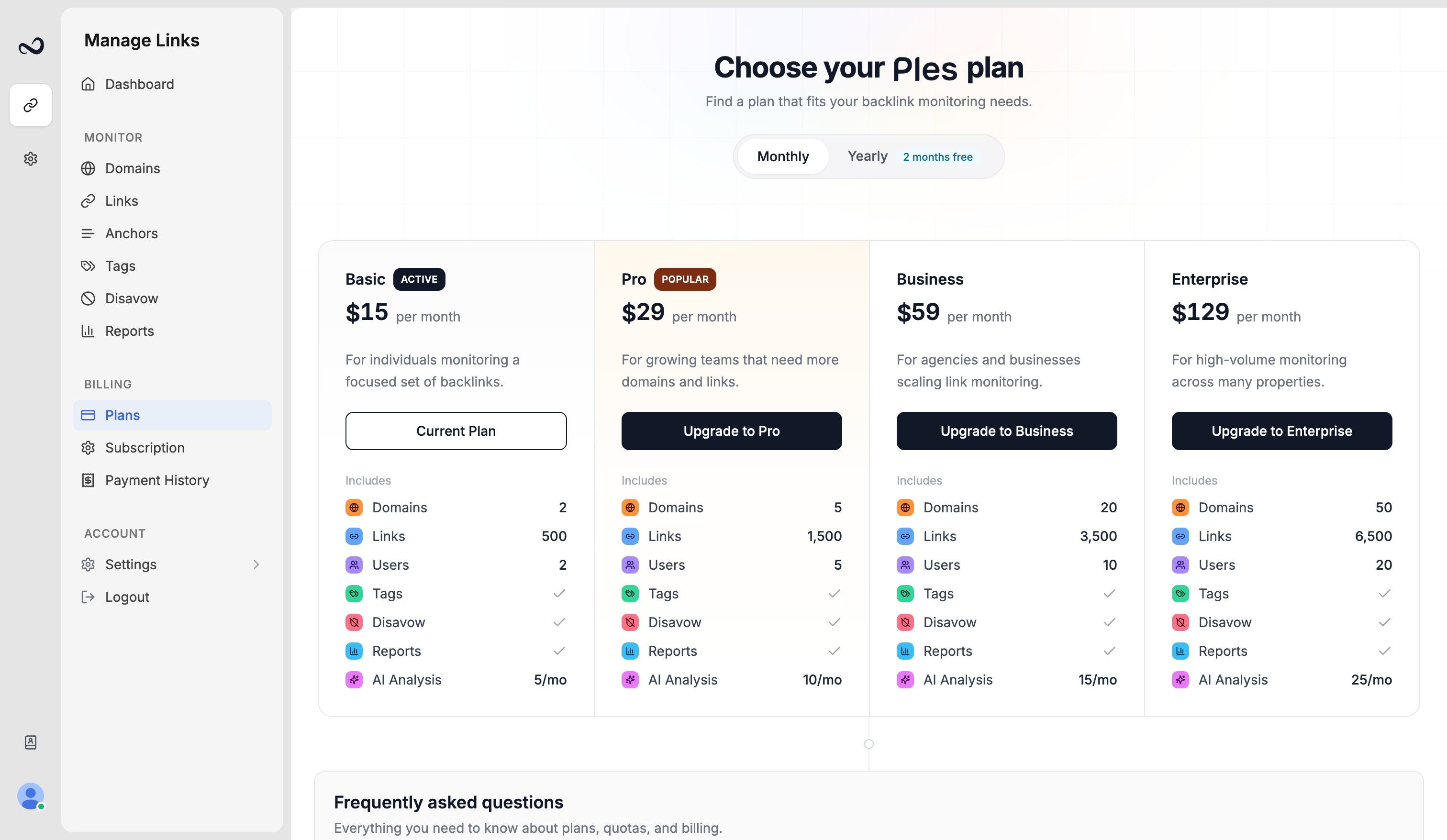
Change plans from [app.ples.com/plans](https://app.ples.com/plans). Only the owner or an admin can do this.
 ## Upgrade
The new limits apply when payment succeeds. Ples **prorates** the unused time on your current plan and charges the difference for the rest of the period. Confirm the amount in the proration dialog before you pay.
## Downgrade
A downgrade is scheduled for the **end of the current period**. You keep the higher plan until then. Ples cancels the pending change if, on that date, you still exceed the lower plan’s domain, link, or user caps.
## Before you switch
Open [Account](/article/account-settings) and compare domains, active links, and team members with the [target plan](/article/plan-limits).
Remove extra domains, links, or teammates if you are moving down. Ples blocks a change that would leave you over the new caps.
Choose monthly or yearly, then complete upgrade proration or the downgrade schedule. You cannot start another plan change while one is pending.
If David has 5 domains on Pro, he cannot downgrade to Basic (2 domains) until he removes three properties.
## What's next?
Basic, Pro, Business, and Enterprise prices, including yearly billing.
Domain, link, user, and AI caps on trial and paid plans.
See your plan, renewal date, billing period, and reminder preferences.
What to do when Ples blocks a new domain, link, teammate, or AI analysis.
## Upgrade
The new limits apply when payment succeeds. Ples **prorates** the unused time on your current plan and charges the difference for the rest of the period. Confirm the amount in the proration dialog before you pay.
## Downgrade
A downgrade is scheduled for the **end of the current period**. You keep the higher plan until then. Ples cancels the pending change if, on that date, you still exceed the lower plan’s domain, link, or user caps.
## Before you switch
Open [Account](/article/account-settings) and compare domains, active links, and team members with the [target plan](/article/plan-limits).
Remove extra domains, links, or teammates if you are moving down. Ples blocks a change that would leave you over the new caps.
Choose monthly or yearly, then complete upgrade proration or the downgrade schedule. You cannot start another plan change while one is pending.
If David has 5 domains on Pro, he cannot downgrade to Basic (2 domains) until he removes three properties.
## What's next?
Basic, Pro, Business, and Enterprise prices, including yearly billing.
Domain, link, user, and AI caps on trial and paid plans.
See your plan, renewal date, billing period, and reminder preferences.
What to do when Ples blocks a new domain, link, teammate, or AI analysis.