

/links), select one or more rows to run the same action on all of them.
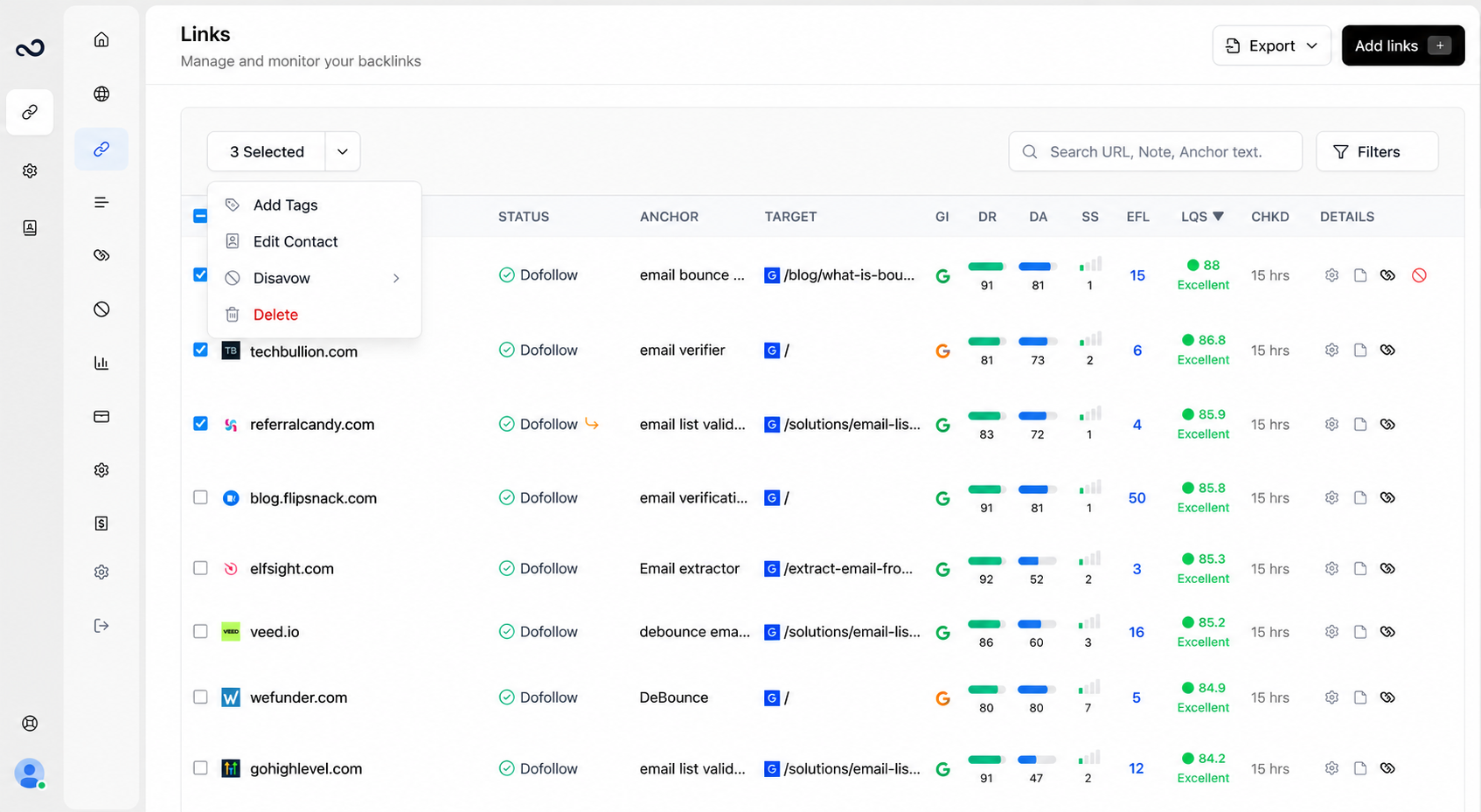
Steps
1
Select rows
Check the boxes on the left, or use the header checkbox to select the visible page.
2
Open the menu
The Selected button appears. Open it.
3
Choose an action
Available actions (depending on your permissions):
- Add Tags — assign tags (still max 5 per link)
- Edit Contact — assign contacts to the selected links
- Disavow — add as domain, subdomain, or URL, or Remove from the disavow list
- Delete — remove the links from monitoring (frees active slots; does not reset monthly add quota)
4
Confirm
Complete the modal and save. Destructive actions ask you to confirm.
What’s next?
Monitored Links
Read URL, status, anchor, GI, DR, DA, LQS, last checked, and more.
Tags
Create colored tags and assign up to 5 per link.
Contacts
Save a name and email, then assign the contact to the links they placed.
Link issues
Review error, not found, and nofollow links on the Issues page.