

/links-add).
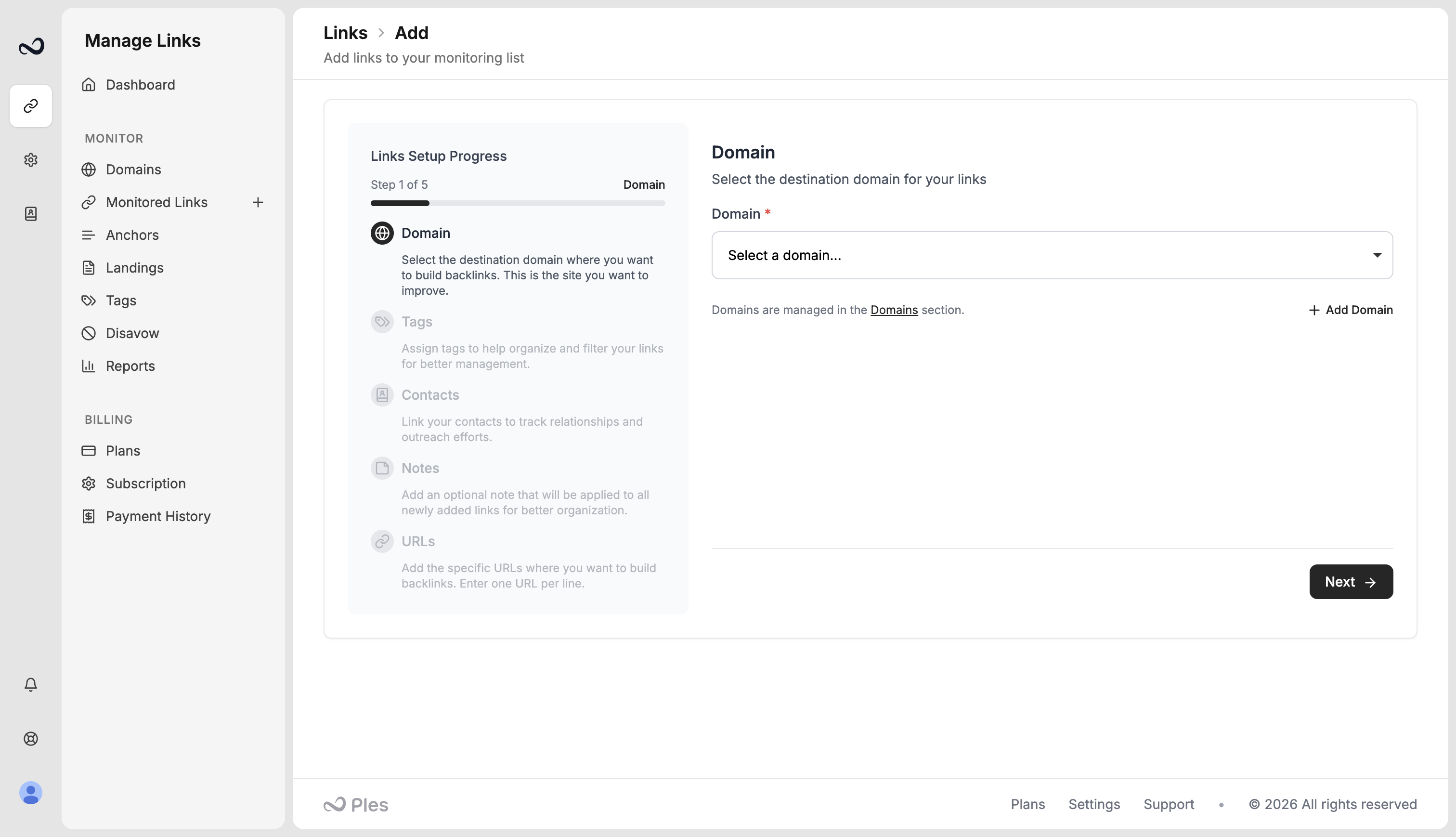
Steps
1
Choose a domain
Select the destination domain. If you still need to add one, use Add Domain on this page. You cannot submit URLs without a domain.
2
Optional: tags
Assign tags (max 5 per link). Skip this step if you do not need them yet. See Tags.
3
Optional: contacts
Assign contacts so you can see who placed the link. Example: David. See Contacts.
4
Optional: notes
Add one note (max 300 characters). Ples applies it to every URL in this submission.
5
Paste URLs and finish
Enter one URL per line, up to 150 per submission. Click Import and Finish. New rows show as Waiting until the first 24-hour check.
You also need an open active link slot and remaining monthly add quota (1.1× your plan’s link limit). Deleting a link frees a slot but does not reset monthly adds. See Plan limits.
What’s next?
Monitored Links
Read URL, status, anchor, GI, DR, DA, LQS, last checked, and more.
Link statuses
Dofollow, nofollow, not found, error, and waiting. Checks run about every 24 hours.
Tags
Create colored tags and assign up to 5 per link.
Plan limits
Domain, link, user, and AI caps on trial and paid plans.